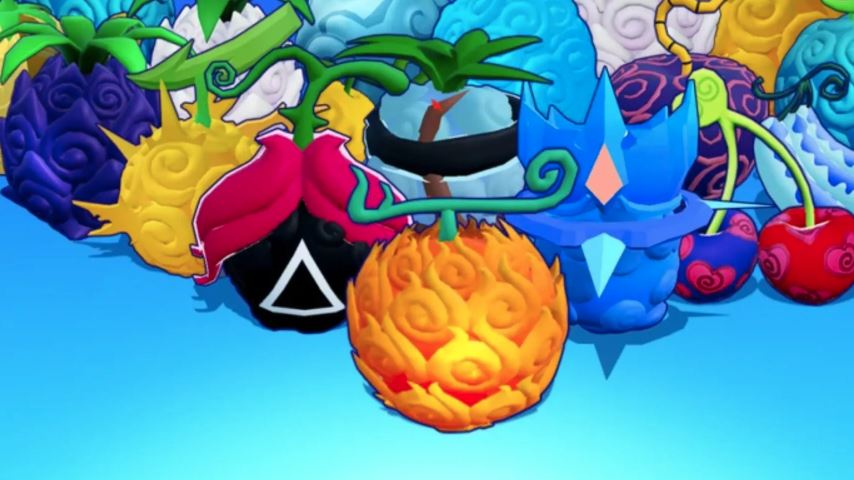
Welcome to the vibrant and combat-heavy world of Anime Fruit, a popular Roblox game inspired by legendary anime series. In this game, you explore islands, defeat enemies, and collect powerful fruits that grant you unique elemental abilities. Mastering the controls is your first step to becoming a formidable warrior. This complete guide breaks down every control for PC and mobile, explains core mechanics, and provides essential tips for beginners.
Complete PC Controls & Keybinds
Playing on PC offers precision and quick access to your abilities. Here is the standard keyboard and mouse layout:
Movement: W, A, S, D (Forward, Left, Backward, Right)
Jump: Spacebar
Sprint: Hold Left Shift
Dash: Q Key
Basic Attack: Left Mouse Button (Click)
Fruit Skills: Z, X, C, V, B Keys (These are your main elemental powers from your equipped fruit)
Weapon Skills: 1, 2, 3 Keys (Skills tied to your equipped weapon)
Open Menu: M Key
Open Inventory/Backpack: B Key
Pro Tip: The Dash (Q) is crucial for dodging enemy attacks and closing distances quickly. Make it a habit to use it in combat.
Complete Mobile Controls & Layout
The mobile interface uses intuitive on-screen buttons. Here’s a breakdown of the standard layout:
Movement: Left-side Virtual Joystick
Jump: Jump Button (usually on the right side)
Sprint: Hold the Joystick forward (often automatic when pushed fully)
Dash: Dash Button (a double-arrow or burst icon)
Basic Attack: Attack Button (a fist or sword icon)
Fruit Skills: Skill Buttons (labeled with icons, often arranged on the right side for easy thumb access)
Weapon Skills: Additional Skill Buttons (usually in the same area as fruit skills)
Open Menu: Gear/Settings Icon (⚙)
Open Inventory: Backpack Icon (🎒)
The functionality is identical to PC; you interact with touch-screen buttons instead of a keyboard.
Core Gameplay Mechanics Explained
1. Fruits & Abilities (Your Core Power)
Fruits are the heart of the game. When you find and eat one, it grants you a set of unique elemental powers (Fire, Ice, Light, etc.).
Your Fruit Skills (Z, X, C, V, B on PC / Skill Buttons on Mobile) become active.
These skills have cooldowns and are your primary tools for dealing massive damage and controlling battles.
Important: You keep your fruit even after dying, so there’s no risk of losing your hard-earned ability.
2. Weapons & Combat
In addition to fruit powers, you can equip weapons.
Use your Basic Attack (Left Click / Attack Button) for standard strikes.
Your Weapon Skills (1, 2, 3 on PC / Skill Buttons on Mobile) provide special combat maneuvers or buffs.
Combat is about combining your basic attacks, weapon skills, and powerful fruit abilities.
3. Leveling Up & Stats
You grow stronger by gaining experience (XP).
Gain XP by defeating enemies and completing quests from NPCs.
Upon leveling up, you can increase your stats (such as Health, Energy, or Damage) via the menu. Prioritize stats that match your fruit and playstyle.
Beginner Tips for Fast Progression
Complete Starter Quests: Immediately talk to NPCs with exclamation marks (!) above their heads. These quests provide essential early-game XP, cash, and guidance.
Master Your First Fruit: Don’t worry about finding the rarest fruit immediately. Learn the cooldowns and combos of the fruit you have. A well-used common fruit is better than a poorly used legendary one.
Use Dash Strategically: The Dash (Q/Mobile Button) is not just for movement. Use it to evade powerful enemy attacks instantly. This is the key to surviving tougher fights.
Grind Efficiently: Find an area with enemies that give good XP but you can defeat reliably. “Grinding” here is a fast way to level up.
Check Your Inventory Often: Press B (PC) or the Backpack Icon (Mobile) to manage your fruits, weapons, and items. Equip upgrades as soon as you get them.
FAQ
Q: What are the most important controls in Anime Fruit?
A: Movement (WASD/Joystick), Basic Attack, and Dash are fundamental. Your Fruit Skill keys/buttons are your primary source of power.
Q: How do I get a fruit in Anime Fruit?
A: Fruits can be found randomly spawning on islands across the map, purchased from dealers, or sometimes obtained as quest rewards.
Q: I died and lost my fruit. Is it gone forever?
A: No. A key feature of the game is that you keep your equipped fruit permanently, even after death. You will respawn with it still active.
Q: Can I have more than one fruit power at a time?
A: Typically, no. Eating a new fruit will replace your current one. Choose wisely!
Q: How do I level up fast as a beginner?
A: Focus on completing all starter quests and then grinding enemies slightly above your level. Always spend your stat points upon leveling up.
Conclusion
Excelling in Anime Fruit begins with a solid grasp of its control scheme. On PC, master the WASD movement, Q for dashing, and your Fruit Skill keys (Z, X, C, V, B). On Mobile, get comfortable with the virtual joystick, dedicated Dash and Skill buttons. Remember the core loop: explore islands, complete quests, defeat enemies to level up, and seek powerful fruits. By using your dash to evade damage, combining your basic attacks with explosive fruit abilities, and wisely investing stat points, you’ll quickly progress from a novice to a legendary fighter capable of conquering any island in the game.