Playing a popular game like The Forge on public servers can be challenging, especially when mining for rare ores. Competitors, griefers, or server lag can disrupt your progress. A Private Server offers a controlled, personal space for you and your friends. This guide explains the simple steps to create one, the costs involved, and how to configure it for the best experience.
Steps to Create a Private Server
Creating a private server for The Forge follows Roblox’s standard private server system. You can do this via the Roblox website or the mobile/desktop app.
1. Go to The Forge Game Page:
Open Roblox and search for The Forge.
Click on the game’s title to go to its main details page.
2. Open the Servers Tab:
On the game page, click on the “Servers” tab located below the game description.
3. Create Your Server:
Look for the green “Create Private Server” button, usually at the top or right side of the servers list.
Click it. A configuration window will pop up.
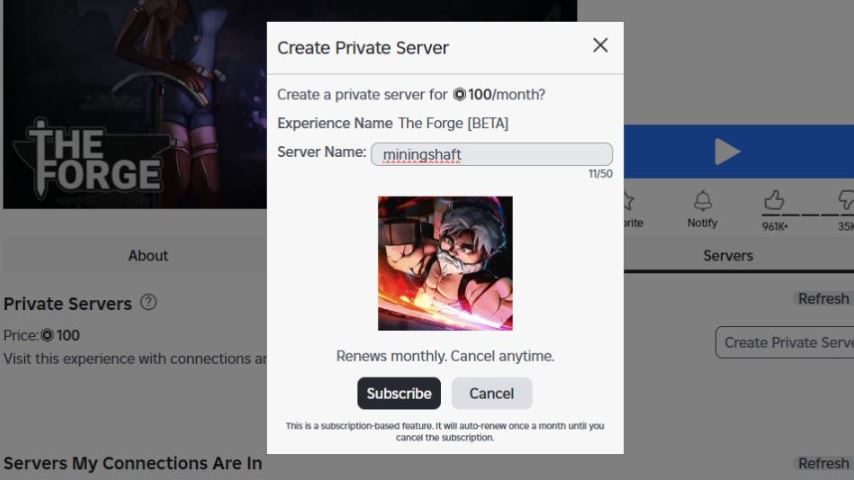
4. Configure and Subscribe:
Name Your Server: Enter a name for your private server (e.g., “Our Mining Guild”).
Review the Cost: The window will show the recurring cost (in Robux).
Click the “Subscribe” button to confirm payment and create the server.
Your private server is now active and will appear in your list under the “Private Servers” section on the game’s Servers tab.
Private Server Cost and Subscription
Upfront Cost: Creating a private server for The Forge requires a one-time payment of 100 Robux. This amount is deducted from your Roblox account balance immediately.
Subscription Model: This payment is for a 30-day (monthly) subscription. Your private server will remain active for one month from the date of creation.
Automatic Renewal: The subscription is set to renew automatically every 30 days, provided you have at least 100 Robux in your account. If you lack sufficient Robux on the renewal date, the server will be deactivated until you manually resubscribe.
How to Configure Player Access and Settings
After creation, you can manage who joins your private server.
On the game’s Servers tab, find your private server in the list.
Click the three dots (“…”) or the “Configure” button next to your server’s name.
In the configuration menu, you will find these key settings:
Subscription Status: This shows if your server is active. Toggle this off to cancel the subscription.
Allow Joining: Ensure this is ON to allow players to enter.
Access: You have two main options:
Friends: Anyone on your Roblox friends list can see and join the server freely.
Manual Invite (Link): This is the most restrictive and recommended setting. Only players who have the unique invite link (which you can copy and share) can join. You can also manually add specific Roblox usernames to an “Allowed Users” list for direct access without needing the link.
How to Cancel Your Private Server Subscription
If you wish to stop the recurring monthly charge and deactivate the server:
Go to the Configure menu for your private server (as described above).
Find the “Subscription Status” toggle and switch it to OFF.
This will prevent the next automatic 100 Robux charge. Your server will remain active until the current 30-day period you’ve already paid for expires.
Key Benefits of Using a Private Server in The Forge
Using a private server provides significant advantages, especially for a resource-gathering game like The Forge:
Uninterrupted Resource Farming: Mine rare ores like Rivalite or Darkryte without competing with other players for nodes. Resources spawn for your group alone.
Security and Safety: Eliminates the risk of encountering exploiters, hackers, or griefers who might disrupt your game, steal your ores, or cause lag.
Focused Gameplay with Friends: Perfect for coordinating mining trips, boss fights, or base building with your guild or friends without random player interference.
Stable Environment: Private servers often run more smoothly as they host fewer players, reducing lag spikes common in crowded public servers.
FAQ
Q: How much Robux does a private server for The Forge cost?
A: It costs 100 Robux for a 30-day subscription. This fee recurs automatically every month if you have sufficient Robux.
Q: Can my friends join my private server for free?
A: Yes. Once you configure the server’s access to “Friends” or provide them with the invite link, they can join at no additional cost. Only the server creator pays the Robux fee.
Q: How do I invite someone if I set the server to “Manual Invite”?
A: In the Configure menu, you will find a “Copy Link” button. Share this unique link with the specific players you want to invite. You can also add their Roblox usernames manually to an allowed list.
Q: What happens if my subscription runs out?
A: The private server will shut down. You can reactivate it at any time by going to its configuration and re-subscribing with another 100 Robux payment.
Q: Can I have more than one private server?
A: Yes, you can create multiple private servers, but each one requires a separate 100 Robux monthly subscription.
Conclusion
Creating a private server in The Forge on Roblox is a straightforward investment that dramatically improves the gameplay experience. For 100 Robux per month, you gain a secure, private world to farm valuable resources without competition or disruption. By properly configuring access for your friends and managing your subscription, you can create the ideal environment for cooperative mining and adventure. For any serious player or group looking to maximize their efficiency and enjoyment, a private server is an invaluable tool.